Monday, October 17, 2022

Archives of Ontario AIMS

With relatively little fanfare on September 29, 2022 the Archives of Ontario retired their older Archives Descriptive Database search site, formerly found at http://ao.minisisinc.com/scripts/mwimain.dll?get&file=[ARCHON]search.htm, with a new tool. The Archives and Information Management Systems (AIMS) searches the following existing databases:

  • Archives Descriptive Database
  • BIBLiON Library Catalogue
  • Government of Ontario Art Collection Database
  • Visual Database

One side effect of how the Archives of Ontario retired the older search site is that if you have any links using the ao.minisisinc.com address...well...they don't work at all and just return a "Server Not Found" error. Sort of frustrating, especially for those of us still dealing with the changes to the Library and Archives Canada site changes and this becomes one more annoyance for us.

Screen capture from 14 Oct 2022 of the Archives and Information Management System (AIMS) home page for the Archives of Ontario collections.

At first glance, for most of us who used the older search site, there really isn't much of a difference for doing basic searches. Except you may get back results that you hadn't seen before since AIMS searches not just one but four databases. This might be a good thing.

However, don't dive into AIMS yet with your favourite searches. Instead, take the time to read the Frequently Asked Questions. You might notice that there is no link to the FAQ on the AIMS home page. That's because I found it by following the "New Online Tool Allows for Easier Searching" announcement on the Archives of Ontario home page.

Both on the AIMS home page and in the FAQ they make mention of having an account. Now you don't need an account to do any searches but if you are wanting to request material in person or online then you will need to have a "Public Secure" account with the Government of Ontario. It isn't that hard to set up the account and after a few minutes I had mine created. Even if you aren't planning on requesting material having this account might be a nice thing to have since AIMS allows you to save bookmarks for the items you find in their databases. However, my AIMS bookmarks I added the day before disappeared so I'm not sure what is going on. Hopefully they will fix this issue since that might be a handy feature for us.

Now if you have saved bookmarks you will probably want to access them again sometime in the future. That activity had me stymied for a while until I found them buried in "Client Profile" on the right side of the AIMS home page once you are signed in.

OK, back to searching.

But first click on that "How to search our database" button before doing your first search to learn about any search tips for AIMS. 

There are two important tips concerning searching by keywords.

  • Certain common words will be ignored in your search such as: the, a, an, in, of, and, these.
  • The '*' can be used to truncate your search. According to the search tips the '*' isn't really a wild card so you can't put it in the middle of a word like "pate*t" but instead it seems to have to be at the end of the word like "paten*". Why use it? Maybe you want to find all the items in the database that start with "farm" such as "farm", "farming", "farmed", and "farms". The keyword you would use would be "farm*"

I have come across a gotcha when doing searches and that is when you get your results and then hit the back button in your browser to make a change to your search. 

Did I forget to mention that you can't edit the keywords for your search from the search results screen?

The "Search" button is greyed out and you can't press it and the "Searching records..." wheel is spinning but nothing is actually happening. To get out of that annoying state just refresh the browser page with "F5" (at least on a desktop Windows browser...mobile and MacOS users may have to do something different to refresh the page). The "Search" button will work again.

If you want to do an advanced search by just clicking the "Advanced Search" button then you might be a bit confused and disappointed since you will only be able to do an advanced search on titles.

Ya, that had me annoyed too.

Instead, first select the database you want to search on the left side of the screen:

  • Art Collection (only)
  • Archives Repository (only)
  • Library Holdings (only)

Then click on the Advanced Search button to get a list of the fields you can search. The fields listed will be different depending on the collection/repository/holding selected.

Screen capture of the AIMS Archives Repository (only) Advance Search page retrieved on 14 Oct 2022.

The stacked three lines (AKA Hamburger button) to the right of each field brings up a quasi-browsable/searchable list of known items for the field. Or you can type in the information you are looking for in the correct spot in the advanced search screen field list. For example if I want to everything related to land patents in the RG 53 collection I could type "RG 53-*" (without the quotes) in the reference search field. I might event add the word "land" to search on the Scope to filter out items such as "Commissions for License Inspectors" in RG 53-31. 

However, if I do a search with the Reference Code of "RG 1-100-*" and the Title of "Drummond" I get only one result. That applies even if I add the '*' to the end of Drummond. Yet when I search for a "Higher Reference Code" of "RG 1-100" and the Title "Drummond" (note: no '*') I get 5 results back all with a reference code starting with "RG 1-100-0-0-". Confused? So am I.

So if you don't results that you expect when doing an advanced search, try playing around with the search terms and the fields being searched. Each time I go into the Advance Search screen I discover a different or new way to find and filter for the information I'm looking for.


You might have noticed two additional collections on the left side of the screen: "Immigration Records" and "Second Heir and Devisee Commission Case Files"

The Immigration Records page brings up the search page for the Toronto Emigrant Office Assisted Immigration Registers Database. This is a database index to the four volumes of assisted immigration registers created by the Toronto Emigrant Office between 1865 and 1883 (series RG 11-3). 

The Second Heir and Devisee Commission Case Files Database is a searchable index to the 5184 case files that document claims made to the Second Heir and Devisee Commission.


Keep in mind that this is a new system and there will be glitches, issues, and probably changes over the coming months. I've already experienced some interesting glitches such as where the search results didn't appear even though AIMS said there were 133 items. I had to try the search a few times and then all was good...for now. A few days ago the system was really slow (minutes slow!) to even bring up the home page one evening. There also appears to be a timeout where the system has automatically logged me out from my account out after a bit of time.

So try to be patient as the Archives of Ontario transitions to AIMS. But if you do find an issue, bring it to their attention!

Have fun searching the new Archives and Information Management System (AIMS)!

Thursday, October 13, 2022

Beginner's Guide: Finding Ontario Civil Birth Registrations

One of the most common questions I see asked in the various Facebook groups related to genealogy is along the lines of, "How do I find an Ontario birth certificate for a relative?"


Registration or Certificate?

Keep in mind that usually folks aren't actually looking for the birth certificate but a copy of the completed birth registration form. When I was born back in the 1960s the paperwork that was filled in was titled "Statement of Birth". That document has all the details about my birth such as my parents, their age and province where they were born, and other details about my birth. There is also the Ontario Birth Certificate card but that only has my name, date and place of birth, and the registration number. As genealogy and family history researchers we generally want the document with as much information as possible.

Depending on the year the Ontario birth registration form that is publicly available may be one with space for recording the details of six children or the form may be a two page form with each line an entry for a child. If the registration is found on a two page form then make sure you also download that second page!

Years Covered

Before even starting to answer the question we need to know the approximate time frame when they suspect the birth took place. If it is between 1869 and 1920 then the initial short answer is often to have the original poster visit the "Ontario Vital Statistics Home page > Birth Registrations" "Birth, marriage and death registrations" page from the Archives of Ontario and read what  has been written and also review Research Guide 202, Vital Statistics Records archived by the Internet Archive's WayBack Machine. I strongly recommend everyone at least read that Research Guide even though the URLs within may not work.

Why 1869 as the starting year?

On July 1, 1869 CAP. XXX, An Act to provide for the Registration of Births, Marriages and Deaths came into effect in the Province of Ontario. That was the date people were supposed to start registering births with the civil authorities. The magic word is "supposed". In the paper "Incomplete Registration of Births in Civil Systems: The Example of Ontario, Canada, 1900-1960" that originally appeared in the HISTORICAL METHODS, Volume 23, Number 1, Winter 1990 by George Emery of the Department of History at the University of Western Ontario it states that:

"...the provincial inspector of Vital Statistics guessed that the returns for 1898 were only 80 percent complete..."

This was almost 40 years after the act came into effect. No wonder we sometimes have challenges finding the birth registrations in Ontario!

What about the 1920 as the ending year?

As I write this there is a 105 year privacy veil over the Ontario birth registrations. After the 105 years have passed the Office of the Registrar General for Ontario transfers the indexes and registrations to the Archives of Ontario. 

If looking for a birth registration before 1869 you might get lucky and find it as a delayed birth registration. Otherwise you will be looking at church registers for baptism records...assuming the denomination the family belongs to practices infant baptism...and hoping the priest recorded when the child was born.

If the birth is from 1921 or later then one needs to apply though ServiceOntario at the Official government ID and certificates page. Note that there are restrictions for who can request the records and a fee is charged. Make sure that you request the "Certified copy of birth registration" copy. It is a little more expensive but it "...contains any changes that have been made to the birth registration including any name changes and corrections of information (as a historical record)" and is a copy of the original registration.

Where are the Records?

Archives of Ontario

For those living or visiting Toronto, Ontario, Canada then you can visit the Archives of Ontario and look at the various microfilms in person up to 1920 and also access the images for the registrations that have been digitized.

FamilySearch

FamilySearch has the digitized microfilms of the Ontario birth registrations and indexes in their "Births, stillbirths, and delayed registration with indexes, 1869-1912" collection. What is really nice about using FamilySearch is that the site is free. If you don't want to have to manually go through the various microfilms, FamilySearch has a collection specific search page "Canada, Ontario Births, 1869-1912". There you can search by name, place, year range, and even by the names of the parents.

Screen capture from FamilySearch of the "Canada, Ontario Births, 1869-1912" database with images search page.

Why search by the names of the parents? You might just find children who were born and died between the census years, what I often call the "lost children".

However, FamilySearch in their "Births, stillbirths, and delayed registration with indexes, 1869-1912" collection also has the index pages created by the government. In those tricky cases when I can't find the birth registration using the usual search tools I may manually look through these index files to see if I can spot the name I'm looking for and then, with the registration number, look up the registration itself in the digitized microfilms. 

Is it easy? Not necessarily but once you get used to the process it actually isn't too hard.

But what about after 1912? For that we need to go to Ancestry.

Ancestry

Ancestry has their "Ontario, Canada Births, 1832-1918" collection. Wait a second...1832? Yes, there is an entry that states that Henry Purdy was born 31 May 1832 and registered in the County of Carleton in the Division of Huntley on 25 Sep 1883. [Note: this image below was taken in 2022 before Ancestry made available the 1917 birth registrations on their site and then the 1918 birth registrations in February 2026.]

Screen capture from Ancestry.ca of the "Ontario, Canada Births, 1832-1916" search page.

Much like FamilySearch, you can search this Ancestry database based on a number of categories. There have been times where I've searched just on a first name, a specific year, and a county to find a last name that has been incorrectly transcribed either due to the poor quality of the image, horrible handwriting, or the failing eyesight of the transcriber (at least that's what I hope it is!).

You can access the search results in this collection if you have a subscription to Ancestry or from most Ontario public libraries for free.

What Ancestry doesn't have is the original indexes created by the government. Fortunately for us Wayne Bower was kind enough to digitize the 1914-1917 index images from the microfilms from the Archives of Ontario and make them available on his page "Ontario Birth Registers 1914-1917". Notice that Wayne includes the index pages for the 1917 registrations. 

Screen capture of part of a page of the Ontario Vital Statistics Index for 1917 for the letter M p. 12 from Bower-McBurney Genealogy - Ontario Birth Registers.

Between FamilySearch collection and Wayne Bower's work we have the vital statistics indexes from 1869-1917 with the exception of 1913. We can't win them all but I know I will gladly make use of what I can find!

MyHeritage

MyHeritage also has the Ontario birth registrations. For those who are members of Ontario Ancestors, AKA Ontario Genealogical Society (OGS), we have access from home to the library edition of MyHeritage. Even some public libraries have this access so check with your local library. There we have access to their "Ontario Births, 1869-1912" collection. Unfortunately it is only an index.

Screen capture from MyHeritage from the Ontario Births, 1869-1912 collection for Margory May Payne, born 12 May 1910.

But...

If you look closer at the information in the index entry you will notice a Digital Folder Number along with an image number in the returned information. That "Digital Folder Number" is the "Image Group Number (DGS)" on FamilySearch. The Image Number is the number of the image (good name isn't it?) found on that digitized microfilm roll. So if one wants to see the image (we always do, right?) then we can search for the Digital Film Number on FamilySearch and, once it is located, go to the image number indicated.

Findmypast

For those using Findmypast the Ontario civil registration of births can be found in their "Ontario Birth Index 1860-1920" collection. There we will find the transcription and a link to the images. I know it says it is up to 1920 but since the Archives of Ontario's partner Ancestry doesn't even have the 1919 registrations online something must be a little strange. It turns out that the 1920 birth registration is actually the back side of a 1904 Delayed Registration of Birth and is not a birth date at all...oops. The same sort of issue exists with the lone 1919 registration. It was filed in 1919 but it seems to be for a 1911 birth.

Based on the index copyright notation on the transcription it would appear that Findmypast is making use of the index from FamilySearch to aid in the searching of this collection.

Other Sites

One of the other sites I will sometimes use is The Ontario Vital Statistics Project. I like this site for a few reasons. The first is that the records are transcribed by folks not associated with FamilySearch or Ancestry. So they might see the written words differently. Also, the transcriptions are alphabetical in columns and I can quickly glance through a page.

Screen capture from The Ontario Vital Statistics Project for Ontario Birth Registrations "Maa_Maq" Surnames page.

Of course the local historical or genealogy societies might also have created indexes to help you in finding the civil registration of birth. So check your local societies or public library for those works.

Still Can't Find It!

It could be as simple as the birth may not have been registered. The paper by George Emery, "Incomplete Registration of Births in Civil Systems: The Example of Ontario, Canada, 1900-1960" which I mentioned in the Years Covered section goes into some detail about this issue.

Don't be fixated on the year or place that you may have found for that person via other records. People may not even know the year they were born so at some point they may have settled on a year that they felt they looked like as an adult. Also if the mother-to-be is having her first child or experiencing a difficult pregnancy then she may have gone to live with her mother or an older sister for support and help with the birth. These folks may live in another county, province, or even country. So be open to possible suggestions and hints from the various genealogy sites.

An alternate source and often the most promising one for the 1869-1920 period, and of course the time before civil registration, are the parish registers of the various denominations in the area the family resided. It will all depend on what church they attended as to whether the records have been digitized and placed online for easy access. Sometimes, if you know the religion the family followed, it is easier to write an email or letter to the local churches asking if they can look for a possible baptism entry in their registers. Hopefully the priest or clerk also wrote down the date of birth in the register.

You can also find in the 1901 Census of Canada the recording of the date of birth for everyone listed in the household. However, I always take the date recorded there with a huge grain of salt. If all the other dates of births in that census for the other family members of household can be corroborated as being accurate then the odds are that one birth date are you are looking for is correct.


Hopefully some of the guidance here will help you locate that elusive Ontario civil birth registration or at least confirm the date of birth in other records.

  • [8 Jun 2024: updated for 1917 birth registrations that are now available through Ancestry]
  • [7 Feb 2026: updated for1918 birth registrations that are now available on Ancestry, what is held by the Archives of Ontario, and the Archives of Ontario URLs]
  • [23 Apr 2026: updated for 1920 birth registrations that are now held by the Archives of Ontario]


Monday, September 26, 2022

Finding on the Ground: An Urban Address

In my various "Finding on the Ground" series of posts the one type of property I kept glossing over were the lots in the urban areas. I kept ignoring those places for only one reason...it can be a challenge locating the records on the Ontario Land Property Records Portal, AKA OnLand. However, in this post I will walk you through the process and resources I used to find a lot in Galt, now part of Cambridge, Ontario.

The initial question was posted in the Ontario Ancestors group on Facebook:

"I know of a house in Cambridge (Galt) that I would like the Concession and Lot number.
Once I have that I know how to retrieve information off of Onland.ca, I just need the actual Concession/lot.  How do I find this please."
After a bit of back and forth to get the specific address and the person of interest (just a reminder of the importance of providing detailed information in your questions: Asking Good Questions; Creating Good Answers) I learned the following details:

  • The modern address in Galt is: 46 Park Hill Rd (West of the Grand River) in Cambridge, Ontario.
  • She is looking for information about the land transactions involving William John Millican since he own that property around 1883.

And so the adventure began!

Step 1 - Where is it now?

The first step I took was to search the OnLand Property Address in the virtual Waterloo Land Registry Office (58). Why that LRO? I didn't know which office was responsible for Galt or Cambridge so I just typed in Galt, it's shorter than typing Cambridge, in the "Find your Land Registry Office" box and OnLand informed me that it was in "WATERLOO (LRO 58)"

For the address I initially typed "46 Park Hill" but no results were returned. So I just removed the space between "Park" and "Hill". Sometimes you do have to play around with the name of the street to get the "right" name in OnLand. Eight results appeared with almost all of them for 46 Parkhill Road West Cambridge found on Lot 1 in Plan 470 of Cambridge. But there was also a 46 Parkhill Road East. 

Partial screen capture of the Address Search results for 46 Parkhill in Waterlook (LRO 58).
Partial screen capture of the Address Search results for 46 Parkhill in Waterlook (LRO 58) on OnLand.

So which one is it?

I started with an assumption that the 46 ParkHill Road West was the one I wanted so I next switched to the Property Map feature on OnLand and searched by the street name "Parkhill". Three possible streets were listed: PARKHILL CRT, PARKHILL ROAD, and PARKHILL ROAD EAST. Since I didn't see a "PARKHILL ROAD WEST" listed I selected just "PARKHILL ROAD". 

Screen capture of "Search by Street" for Parkhill in Waterloo (LRO 58) on OnLand.

It looks like I choose wisely since that road is west of the Grand River.

I then zoomed out on that map. Just a word to the wise, it does take a few seconds for OnLand to redraw the map so be patient and take it slowly. 

It looked to me that Park Hill Road West might be within Concession 11 possibly on lots 9, 10, or 11 based on the other lot notations nearby. The map also seems to indicate that it is "WGR" (West of Grand River) so it could be within lot 1 or 2 WGR. So we still have some work to do.

Step 2 - Historical Abstract/Index Books

Next it was off to the Historical Books section for the virtual Waterloo Registry Office.

Normally I would browse these books but since I have a plan number from the address search I searched for Plan 470. Amazingly only one result was returned. Unfortunately it seemed like the instruments start from 1905 and I'm looking for property from around 1883. Yet there are still some very useful clues found if I pay attention. On the first page it says "James Patterson's Sy" and the next states "James Patterson Survey" at the top. On the third page it has written near the top "From 10 in 11th Con"

At this point in my research, since I was doing this on a Saturday and it was approaching 6 p.m., I no longer could use OnLand since they shutdown access to these resources at 6 p.m. on Saturday. GRRR!

I decided to go to the "Make a Topographic Map" site from the Ontario Government. Under the Navigation option in the top menu bar I selected Search and then Address as the type of search. There I typed "46 Park hill road west, cambridge" (without the quotes) and the map automagically zoomed in to the location. If I had typed "46 parkhill road west, cambridge" this site was actually smart enough to suggest "46 Park Hill Road West, Cambridge". But I did find that I had to state "road" as part of the address. The "west" was optional since it gave suggestions for the full address.

From there I zoomed in until I spotted faintly written clues like "LOT 3 WEST OF GRAND RIVER CON 11" AND "LOT 2 WEST OF GRANT RIVER CON 11". Looking at what looks to be boundary lines it would seem that "46 Park Hill Rd W" lies within Lot 2 West of Grand River, Concession 11. Again, that is a guess but it seems to match the note from the plan documents.

Next it was off to FamilySearch to look in their copies of the Abstract Index Books found under "Canada, Ontario, Waterloo" for Galt.

Looking on FamilySearch in the Abstract Index Books under "Canada, Ontario, Waterloo" for Galt (v. 1 & 2) I come across in Volume 1 of the Galt books for the "Town of Galt" a page for "Subdivision Lot No. 2 Concession XI West of Grand River: Sometimes called North Halves of Lots Nos. 10 and 11" at https://www.familysearch.org/ark:/61903/3:1:3Q9M-C3H6-T3LM. The details are found on the bottom half of that digitized page. The instruments start in 1841 and go to 1863. Much later on in that same digitized set of books I see "Subdivision Lot No. 2 West of Grand River Conn XI. Sometimes called North halves of Lots Nos. 10 & 11" (https://www.familysearch.org/ark:/61903/3:1:3Q9M-C3H6-TS7M) and those instruments go from 1866 to 1877. That appears to be continuation of the first page but found in Volume 2 of the Galt books. Unfortunately the later volumes for Galt aren't on FamilySearch.

Since I was stuck on FamilySearch I had to wait until OnLand opened up for online business at 9 a.m. on Sunday.

Back on OnLand within the Historical Books for the Waterloo LRO (58) I filtered the township/municipality on "Galt". I noticed that there are books labelled 1, 2, 3, 1A, 2A, etc. There was even a Book 2 which had the description "SUBDIVISION 2". So I wondered if they were the volume numbers seen when looking in the FamilySearch Abstract Index Books for Galt. A quick glance and it seemed like they were. Towards the start of some of the books an index could be found (woohoo!) so I checked the first several pages for each of the books and in Book 3A on image 2 I saw "James Patterson's Survey of Pt. 10 Con XI W.G.R. (470)" and it looks like it started around folio [page] 427. That looked really promising based on what was found recorded for Plan 470. Book 3A only went up to page 220 but the images for Book 3B started at page 221 so I started looking there. Page 427 started at image 414 but I didn't see James Patterson's Survey mentioned there so I went to the next image, 415, and there was "James Patterson's Survey of Part of Lot No. 10 Con XI W.G.R". 

It would seem that each folio is made up of two images, a top and a bottom section. There was Lot No. 1 but the entries were from 1884 to 1889 and I didn't see any Millican's mentioned. But in one of the columns it stated "Cont. on page 431". Next it was off to find page 431 stamped in the upper right corner and it was found on image 422. On the second image from page 431 (image 423) there was "Lot No. 1 James Patterson's Survey (Cont. from 427.).

Extract from OnLand's Waterloo (LRO 58), Abstract/Parcel Register Book, for Galt, Book 3B, image 423 of 446 for Lot No. 1 of James Patterson's Survey continued from p. 427.

What do I see but a B & S, instrument 8227, on 14 Mar 1890 and registered 18 Mar 1890, with the grantor being James Patterson et ux and the grantee listed as W.J. Millican.

Keep in mind that these books for Galt are a real mess when it comes to how the abstracts were recorded since the top of the page stated "Lot No. 11 Concession X" but we have other lots apparently not on that concession listed on the same page.

Step 3 - Ordering

The next challenge might be to get a copy of that B&S instrument, no. 8227. However, a copy isn't available on FamilySearch since they only have the Land Record copy books up to 1875. This means ordering the document from OnLand and I've written how to do that in my post "Finding on the Ground: Ordering from OnLand".

The first step is to "create" a registration number using a prefix code and the instrument number. To find that prefix code I needed to click on the "correct prefix and range" link found on the "Instruments, Plans and Evidence" page accessed from the OnLand Documents page. That link brings us to the ServiceOntario Prefixes and Cross-References page. Opening up Waterloo LRO 58 there is a PDF link for the Instrument Prefix List for Waterloo. Scrolling through the PDF I see that there is a "Galt" entry which covers the time period of 1853 to 1955 and instrument numbers 1 to 55023. That look to be the right place, years, and instrument numbers so the prefix code associated with that instrument number should be "D". Combining the prefix code just identified and the instrument number of 8227 I get a registration number "D8227". This was the only easy part of the whole process!

At this point, if this was my family, I could place the order for $3 plus tax. I might even order some of the other documents mentioning W. J. Millican.

Wrapping it up

I will gladly admit that I really do dislike trying to find the transactions which took place in urban environment. Urban areas can be a really challenge due to issues such as changing boundaries, going from concession and lots to plans or sections, and street names being changed. Of course, how the registrations for Galt are recorded didn't make it any more enjoyable. It turned out that the note from Plan 470 which stated "SURVEY James Patterson" was key to finding William John Millican's property without spending hours looking through all the books. So pay attention to the whole page and surrounding pages for potential clues!

Yet don't give up when looking for the land records of those who had property in urban environments. It is a bit more challenging that those simple concessions and lots but just a rewarding.


Wednesday, September 21, 2022

Stop Following the Herd!


Bernard Spragg. NZ, "The ewe flow", 29 Jul 204, public domain, Online image, Flickr (https://www.flickr.com/photos/volvob12b/8096349137 : 21 Sep 2022).

One thing I often see both novice and experienced researchers doing is taking the short cut of trusting the research of others. It doesn't matter if it is on a tree on Ancestry, the common tree found on FamilySearch, compiled histories handed to you by a relative, or even in published books. It is all fine and dandy to use other trees for clues and hints but trusting should be out of the question!

I'm going to highlight an example of why trusting other trees is a bad idea.

I periodically go to the common FamilySearch tree to see if there have been any changes to folks that I'm following. Recently I noticed an update to Moritz Schoenberger (LXSK-9NP). He isn't a direct relationship to me but he is connected to my tree as the great-grandfather of husband of a grandaunt. That's when I noticed that I hadn't reviewed his tree on FamilySearch and, based on the list of children and only one spouse recorded, there were errors and missing issues. So I started drilling down into his family to do the usual minor updates or to provide additional details that I've discovered over the past few years.

That is when I noticed something I didn't have for Emil Schoenberger, the son of Henry Schoenberger and Lilliam Fischer,...a wife.

Screen capture for the profile of Emil Schoenberger, son of Henry Schoenberger and Lillian Fischer, from the McKinlay-McMullen database on Legacy Family Tree.

This is the the family profile from FamilySearch for the supposedly same Emil Schoenberger as of noon (ET) on 21 Sep 2022.

Screen capture for Emil Schoenberger (LX35-QT1) from FamilySearch as of 14h00 21 Sep 2022.

Anytime that I come across a discrepancy between my personally created tree and those I find online I automatically assume that I'm in the wrong and I work to verify that the information I've just come across is accurate. In the case of Emil, son of Henry and Lillian, I have quite a bit of information about him by following him and his parents through the various United States federal census enumerations including the 1950 census where we find him with his parents and recorded as unmarried:

1950 U.S. census, New Haven County, Connecticut, population schedule, New Haven, enumeration district (ED) 12-107, sheet 16, household 184; digital images, Ancestry (www.ancestry.com : accessed 21 Sep 2022); citing National Archives and Records Administration microfilm T628, roll 3792.

So what about this Louise Joos that Emil is supposed to have married?

A quick check on the "Connecticut Vital Records — Index of Marriages, 1897-2001" site from the Connecticut State Library revealed that an Emil Schoenberger and a Louise Yoos were married on 30 Jun 1932 in Hartford, Hartford County, Connecticut, USA. Why don't I just look at the Connecticut marriage registration for details about Emil's family? That should answer the question right away. That costs money and takes a bit of time, especially for someone doing long distance research from Ottawa, Ontario, Canada. Sometimes the easiest path isn't the one that is possible at the time.

Just a second...if Emil was married in 1932 why did it say he was never married in the 1950 census? 

Immediately I knew there was something was amiss. So I checked what I have for "my" Emil in the 1940 Census of the USA. There I saw that he was recorded as a son living in the household of Henry and Lily Schoenberger in New Haven, New Haven, Connecticut, USA and he is single working as a grocery clerk.

So it was time to stop and look at this family of Emil Schoenberger and Louise Joos/Yoos from the beginning. On Ancestry I added this couple to my tree but didn't attach them to anyone else and I put in the information I was starting to find. One of the hints on FamilySearch was an obituary for her found on GenealogyBank from the 25 Mar 2005 edition of the Hartford Courant where it stated that she was born on 1 Nov 1906 in Germany and died on 19 Mar 2005 in a local nursing home. The obituary even included her two children, Robert and Margaret. Plenty of information for starting a profile on her household.

With those details entered in Ancestry started giving me hints to other records and the real winner was from the "Connecticut, U.S., Federal Naturalization Records, 1790-1996" collection on Ancestry for the Petition of Naturalization of Louise Schoenberger who arrived under the name "Luise Joos" on 21 Apr 1930 at New York on board the S.S. Berlin. That petition included her children including when and where they were born. It even stated that her husband, Emil Schoenberger, was born in Bavaria Germany on 12 Sep 1901 and he arrived in New York, New York in April 1926. 

How do I know that this is the same family found in that Connecticut marriage index? The petition also gave the date and place they were married: 30 Jun 1932 in Hartford, Connecticut. The same information found in the index. 

Just based on that one document I knew that there were at least two people with the name Emil Schoenberger residing in Connecticut at that time. One who apparently was born in Connecticut, the son of Henry and Lillian Schoenberger, and the other was born in Germany, the husband of Louise Joos.

The next step was to find the household of Emil and Lillian Schoenberger in the 1940 and 1950 census of the USA. Since I also had the names and birth years of their children it was really easy. In 1940 I found the household of Emil and Louise with their two children residing at 66 Busnhell Street in Hartford, Hartford County, Connecticut. There Emil is recorded as a cabinet maker. In the 1950 census I found the family still living at that address and Emil is still a cabinet maker. In both the 1940 and 1950 censuses Emil and Louise are recorded as being born in Germany.

1950 U.S. census, Hartford County, Connecticut, population schedule, Hartford, enumeration district (ED) 10-149, sheet 3, household 30; digital images, Ancestry (www.ancestry.com : accessed 21 Sep 2022); citing National Archives and Records Administration microfilm T628, roll 5302.

In Emil's Petition for Naturalization dated 28 Apr 1933 he states that he married Louisa on 30 Jun 1932 in Hartford, Connecticut and at that time only one child was listed since the second child had yet to be born. He also stated he was born 12 Sep 1901 in Kohlberg Bougern, Germany, arrived in 1926 on the Bremen, and is a cabinet maker.

As I discovered and entered in information into Ancestry about the Emil who lived in Hartford and was married to Louise even more details appeared such as his date of death in 1980 and even a copy of his obituary from the Hartford Courant on Newspapers.com. The details in that obituary closely match what had been found in the census enumerations of his family and even his petition for naturalization. I knew I was looking at the right person.

Some very interesting differences between the two Emil Schoenbergers can be found once one starts to examine and read the records available online in various places.

I'll now be off to fix up that common tree on FamilySearch and send a note to several tree owners on Ancestry about the error in their individual trees.

I leave you with this thought though...

STOP following the herd in your research!

Tuesday, August 2, 2022

Asking Good Questions; Creating Good Answers


It seems that I keep addressing this issue in my blog every few years: Questions and Answers: Dos and don'ts, Comments about Facebook Comments and Genealogy, and Answering Facebook Genealogy Questions. Yet here I am again with more suggestions and ideas...

One of the biggest challenges I come across when helping people out in their genealogy research is trying to decipher what kind of help someone is asking for when they have a genealogy conundrum. This happens in the genealogy related groups I participate in on Facebook and also in the various in-person drop-in meetings with fellow researchers.

Also, it isn't just the questions being asked that are sometimes a challenge but also in the answers provided by those kind hearted souls who have taken the time to respond.

The Question

Asking a good question actually brings us back to our days in school when we were (hopefully) taught the five "W"s: Who, What, When, Where, and Why. Having you question cover the 5 "W"s, especially when it comes to asking a research question about a person or event, really helps those willing and able to answer what is being posed.

Who

Who are you looking for? I don't mean the relationship or nickname used by the family such as "I'm looking for the parents of grandmother Sippy?" but the actual name of the person. If it is a woman, consider providing both her maiden and married surname(s).

What

What are you looking for that the group or individual might be able to help you discover. This is where it is important to be specific. Asking for "I'm looking for information about John Smith?" isn't generally going to get you much help. However, "I'm looking for an obituary or death notice for John Smith who died around Aug 10, 1950 in Toronto, does anyone know where I should look?" will probably get you a few leads and even possibly a specific answer.

When

No, not "I need it now" but what is the time period the event took place. If a date or range of dates isn't provided the first question asked back is often "For when?" Depending on the time period the records can be held in different jurisdictions or may be in a different format than expected. A petition for land in Upper Canada might actually be found in the collections for Lower Canada if we go back far enough. It could also be that a law came into effect on a certain date and before that date you have to be a bit more creative in what records are examined.

Where

The where, much like the when, is a critical piece of information to provide in your question. As you dig deeper into your research you quickly find that borders and jurisdictions change more often than we realized. We find this challenge with changing borders everywhere in our research. It is also why best practice is to record the place of the event with the place name used then and not now.

Why

The why isn't always necessary but it can help others understand the reason you are looking for the information. Stating "I'm working on my Mayflower descendant application and I'm looking for assistance in connecting Jonathan Starr to his son Samuel who married Ann Bushell" might attract the attention of those who have worked on similar lineage society applications or those with an interest Mayflower research.

The Answer

Yet what about those answering the questions? 

One of our goals when answering a question should be to educate the person asking the question. Just giving a one line answer or image (kindly respect the copyright folks!) only resolves the immediate question. If we also provide the "How" we found the answer we provide the questioner with possibly a new tool in their research tool box.

How

  • Was it searching a collection on a genealogy site? What is the name of the site and collection? Did we do something special to find that record or document?
  • Was it found using our favourite search engine? What were the keywords used? Did we use a lesser known feature of that search engine to find the information? If so, a line clarifying it will educate other readers of your answer. My favourite is using the ".." (double dots) on Google to look within a range of numbers like "1850..1870".
  • Did you have some sort of arcane knowledge gained when doing your own genealogy research? A bit of "patting yourself on the back" for knowing and then sharing a cool fact is not necessarily a bad thing!

I will also sometimes see fairly short and terse responses, especially for questions that seemingly always pop up. I can understand the frustration of always answering the same question over and over and over again. So keep in mind that the person asking the question will probably not have hear or seen the answer before. That is why they are asking the question in the first place.

The Thank You

I know I shouldn't have to write this part but sometime, in our haste, we forget the thank you.

For the one asking the question there is one more thing to keep in mind, thank and acknowledge the person who has taken the time and trouble to help you out. When in person this is almost always automatic and a "Thank you", a nod of the head, or a smile all go a long way.

On social media like Facebook a simple "Like" is often sufficient. As someone who answers a number of questions seeing the "Like" means that my time to help you out was worth it and you appreciated my answer.


Monday, July 25, 2022

Caveat lector!

On the Who Do You Think You Are? episode first broadcast in Canada on Sunday, July 25, 2022 the show focused on Stephen Hopkins, an ancestor of Allison Janney. In that episode they used the "U.S. and Canada, Passenger and Immigration Lists Index, 1500s-1900s" collection found on Ancestry as the hook to start the story.

Right away the title of the collection should set off alarm bells in a good researcher's brain for it is an index. Indexes themselves are not a bad thing for they quite often point us to the source material and can act as a holding citation in our research until we can find and read the source document. Yet how many of us actually pay attention to details recorded in the index?

Before looking at the "U.S. and Canada, Passenger and Immigration Lists Index, 1500s-1900s" collection on Ancestry I just want to note that the source citation information displayed on the computer Ms. Janney was using differs slightly from what I see on my own desktop. Nothing major though, just information displayed on different tabs or in a different order. On the show Ms. Janney was looking at the "Citation details" tab of the record to read the details of the place, Bermuda, and year, 1609-1910, concerning Stephen Hopkins. Here is the same information found in the "Ancestry record" tab.

Screen capture of the Ancestry record tab for Stephen Hopkins arriving 1609-1610 in Bermuda from the Source citation for U.S. and Canada, Passenger and Immigration Lists Index, 1500-1900s found on Ancestry.

In this case there really is some great information found in Ancestry's source citation. We learn the arrival years, 1609-1610, and the place, Bermuda. Just like what Ms. Janney read. Yet what is even more important for us as researchers is we learn that the information has been extracted from Terry Tucker's book "Bermuda - Unintended Destination, 1609-1610" published by Island Press Ltd in Bermuda in 1978. The Ancestry record even tells you that you are looking at persons aboard the Sea Venture which was wrecked off Bermuda. If you could find a copy of Terry Tucker's book then you could see if there are included source citations to follow up on. You could even check for other documents and books at archives, libraries, and museums about the Sea Venture and it's unexpected stop at Bermuda.

However, not all the extracts found in the "U.S. and Canada, Passenger and Immigration Lists Index, 1500s-1900s" collection are as good. This is where "caveat lector" comes into play.

We need to rewind just a bit...

When I first ran into this collection a decade ago I was looking for information about my 3rd great-grandfather Luke McMullen who settled in the North Elmsley area of what is now Lanark County, Ontario, Canada. I had already found Luke and his family in the 1851 and 1861 censuses of Canada West. So I knew had had arrived before 12 Jan 1852, the official date of the 1851 census of Canada West (yes, the 1851 census of Canada West took place in 1852). I even knew that his oldest daughter was baptized in 1845 in Perth, Lanark County, Canada West so he should have been in Canada by that date.

Screen capture of the "U.S. and Canada, Passenger and Immigration Lists Index, 1500-1900s" collection record for Luke McMullen arriving 1871 in Ontario, Canada found on Ancestry.

Yet, as we can see from the above screen capture for Luke McMullen's entry in the "U.S. and Canada, Passenger and Immigration Lists Index, 1500s-1900s" collection, it states he arrived in 1871 in Ontario, Canada.

What gives?

This is where, as researchers, we actually have to read the details in and about the record and not just blindly and quickly click on accept before moving on to the next record like a relay race.

First of all, for this collection always read the source bibliography. In this case we learn that the information is from Bruce S. Elliott's "Index to the 1871 Census of Ontario: Lanark" published by the Ontario Genealogical Society in 1992. Right away a yellow flag should be raised in your mind. We have an index pointing to an index. So we will probably want to look at the source documents that Mr. Elliott used to create his index: the 1871 Census of Ontario for Lanark County.

The next place to look on the record from Ancestry is the information in the "Annotation" section. Here we learn that the information concerning the arrival and place is actually the date and place of the census. 

What the <bleep>!

It seems that this record from the "U.S. and Canada, Passenger and Immigration Lists Index, 1500s-1900s" collection for Luke McMullen has nothing to do with when the person actually arrived in Ontario, Canada. All it tells us is that the person was enumerated in Ontario, Canada in 1871. Now some of the censuses of Canada do include a date of immigration but the 1871 census of Canada isn't one of them.

Even more challenging for those using the various censuses of Canada is that, unlike the United States or England enumerations, the census location recorded is supposed to be based on the official residence or abode of the person and not necessarily where they were on that date. I touch about that challenge in my post "Annie Leontine Chipman and a Census Mystery".

This is why it is always, Always, ALWAYS, ALWAYS important for us to read the details about how a record in an index entry on any genealogy site, not just Ancestry, was created. This is even more important when an index has drawn its material from multiple source like what we find for the "U.S. and Canada, Passenger and Immigration Lists Index, 1500s-1900s" collection. 

Then we need to follow those bread crumbs to the source documents. Sometimes it may be going from one index to another index until we actually can find and view the original document, whether it be in a paper or digital format. 

So remember:

Caveat lector!


Wednesday, April 6, 2022

Burford Township...Lost in the Census of 1861 for Canada West

I've already written about one of the challenges with using the copy of the Census of 1861 for Canada West that is found on Ancestry in my post "Missing images from the 1861 Census of Canada West on Ancestry?". Recently though another challenge surfaced and that is one of a missing township.

In a post on Facebook someone was looking help in locating death records in Brant County, Ontario and had mentioned that the couple was married in Burford Township, Brant County and suspected that the husband, who died only a few years after their 1860 marriage, died in the Burford Township area.

The name being sought was John White and his wife Jane (nee Chant) Fox.

Being curious about the family I searched for the couple in the Census of 1861 for Canada West. To my surprise I couldn't find the couple in that census in Burford Township. Maybe the handwriting or the image quality was really poor so I searched just on the keyword "Burford" to see if I could find the start of the enumeration for that township. I got back all kinds of results but they weren't for a place but for people's names.

Something just wasn't right.

That is when my curiosity really took hold and I followed the rabbit down the hole.

I know that FamilySearch has the 1861 Census of Canada West and it is searchable but not all the digitized microfilms are viewable from home.

https://www.familysearch.org/search/catalog/179027
Screen capture from Census of Canada, 1861 microfilm list showing Burford Township found in the FamilySearch Catalog list at https://www.familysearch.org/search/catalog/179027.

There I found for Brant the microfilm which contained images for the town of Brantford and the townships of Brantford and Burford. I couldn't view the images since they are not available to see from home but I could still search that location on FamilySearch.

Screen capture of the partial results searching the "ONTARIO Brant (town of Brantford and townships of Brantford and Burford)" microfilm DGS 4107375 on FamilySearch for John White.

I could confirm that FamilySearch knows about Burford Township and a enumeration did take place in the sub-district. At least I'm not totally losing my mind.

I wanted to check again what Ancestry had, via their virtual filmstrip, for Brant County in their copy of the 1861 Census of Canada West. However, how Ancestry has stitched together the various microfilms doesn't make it easy in this case. Their virtual microfilm starts with the Township of South Dumfries, which based on how FamilySearch has listed the microfilms, is the second microfilm. It wasn't until I got to image 274 of 473 that I finally came across Enumeration District No. 1, Kings Ward, of Brantford in the County of Brant. 

What is interesting is that I was able to find the Agricultural Census for the Township of Burford starting at image 260 (of 473) on Ancestry and it definitely states that it is in the County of Brant.

I know from my previous research into how the various sub-districts are usually arranged on the microfilms for the 1861 Census of Canada West that the Personal census sub-districts are in alphabetical order followed by the Agricultural census returns for that district. So it would seem that Ancestry got the order of microfilms mixed up. That is an annoyance but not too many folks manually search the images for names...but there are enough of us.

So I went to the end of Ancestry's virtual microfilm for Brant and the last image, 473, was for the Personal census of Enumeration District No. 4 for the Township of Brantford in the County of Brant. No Burford Township. The next virtual microfilm was for Bruce County in Canada West and Burford wasn't found at the start of that filmstrip.

So I was off to Library and Archives Canada's "Census of 1861" page to search for a "J White" in Brant District. 

Why "J White"? 

That was one of the names returned in the results on FamilySearch for someone who was listed in Burford Township, Brant county in their results.

Screen capture of Search: Census of 1861 at Library and Archives Canada looking for "J White" in Canada West (Ontario), Brant District.

Not surprisingly I got "Nothing here matches your search" as the answer. It wasn't a surprise to me since Library and Archives Canada uses an index provided by Ancestry for LAC's searchable database for the Census of 1861. So if we can't find the name on Ancestry it is highly unlikely that we will be able to find the name using LAC's database.

Fortunately there is a workaround to view these Census of 1861 images on the Library and Archives Canada site.

On Ancestry the last image on their virtual filmstrip for Brant County had the URL of "https://www.ancestry.ca/imageviewer/collections/1570/images/4107375_00419". That URL actually holds a clue I can use. With the numbers after the "image" part: "4107375_00419" I can build my own URL to access the images on LAC. I just need to add those number to the end of "https://central.bac-lac.gc.ca/.item/?app=Census1861&op=img&id=" (without the quotes) and paste it into my browser. That should get me to the same image on Library and Archives Canada which we found on Ancestry. That newly constructed URL is "https://central.bac-lac.gc.ca/.item/?app=Census1861&op=img&id=4107375_00419" (without the quotes).

When I plunked that URL into my browser I did indeed get the same image I saw on Ancestry. On Ancestry the page number was stamped in the upper right corner and it said "68".

So I started incrementing the last 3 digits going from 419 to 420 to 421, etc. I was hoping to see Burford Township. However, instead I on image 421 it was still in Brantford Township with page number "69" stamped in the corner. Um...69? It looks like we have a real problem. Not only is Burford Township not on Ancestry in this census but there may be missing pages for Enumeration District No. 4 for the Township of Brantford in the County of Brant.

As I kept incrementing that image number on LAC I also found Enumeration District No. 5 for the Township of Brantford in the County of Brant. Then it was Enumeration District No. 6 in the same township. So I decided to try to see if Ancestry might have any of these images just misfiled. So I took the "4107375_00421" number and replaced the "4107375_00419" in Ancestry's URL. Ancestry gave me the "We’re sorry, this page is temporarily unavailable." error. So it looks like Ancestry is missing several Enumeration Districts (different from the District/County) and a Sub-district from this microfilm.

When I got to image 573 on LAC I finally came across the image I always like to find. 

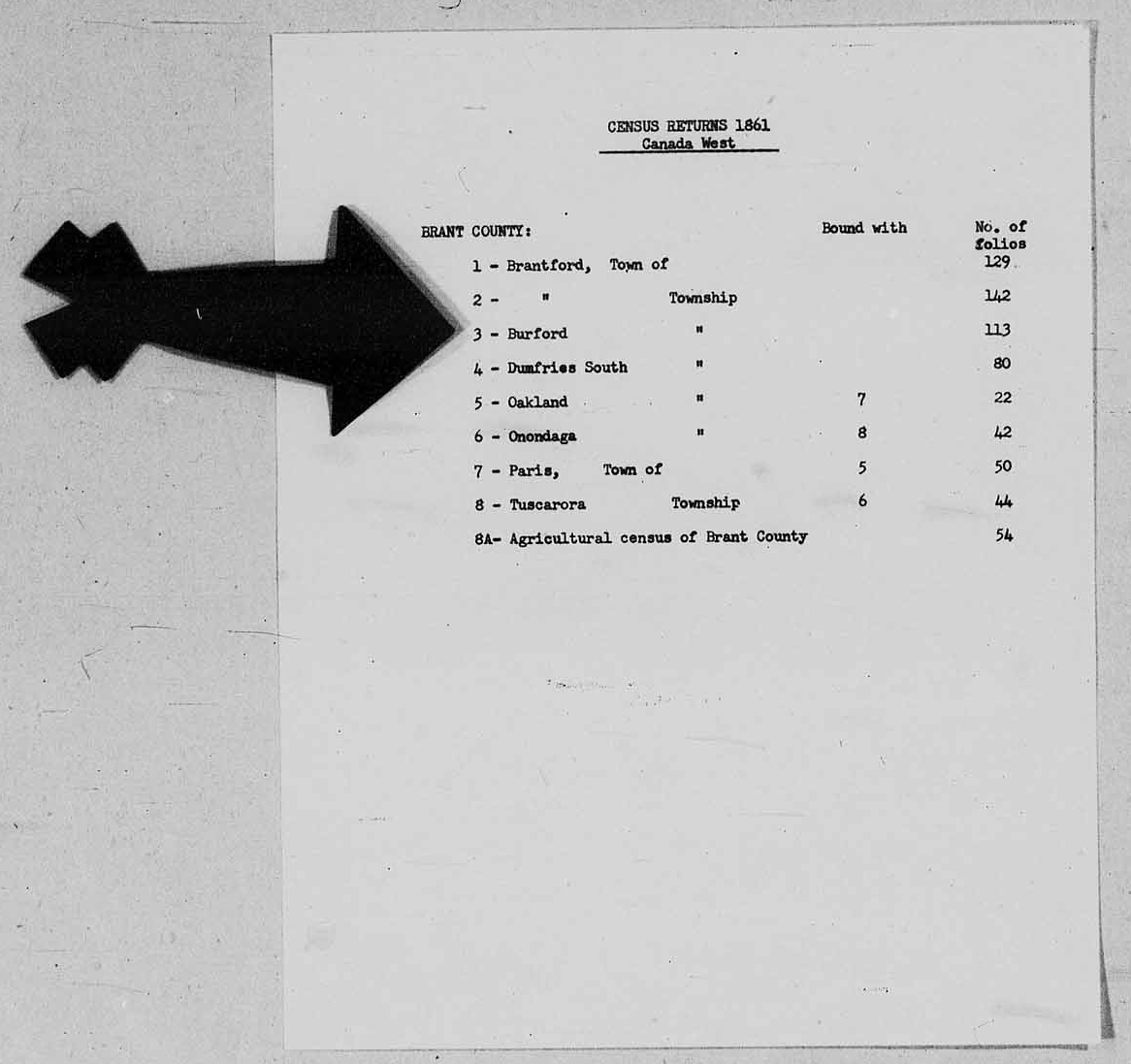
Census of 1861, Canada West, Brant County, sub-district list; RG 31; digital images, Library and Archives Canada, Library and Archives Canada (www.bac-lac.gc.ca : accessed 6 Apr 2022); citing image ID 4107375_00573.

This is the page with the list of sub-districts enumerated in a district. According to this list found on the LAC microfilm there is definitely a Burford Township and it has 113 pages.

A few pages further on I came across the first set of pages of the elusive enumeration of the Township of Burford in the 1861 Census of Canada West.

Census of 1861, Canada West, Brant County, Burford Township, Enumeration District 1, p 1; RG 31; digital images, Library and Archives Canada, Library and Archives Canada (www.bac-lac.gc.ca : accessed 6 Apr 2022); citing image ID 4107375_00576.

It turns out that the last census image on that microfilm is image 813 which the second half of the stamped page 113 for Enumeration District No. 3 of Burford Township in the County of Brant.

So for those attempting to find their family residing in Burford in the 1861 Census of Canada West it becomes a bit trickier than just typing a name into Ancestry and clicking search. Here are the general steps I would take:

1. Find the person in the searchable index on FamilySearch but restricting the search to DGS 4107375, the digital microfilm number found on FamilySearch, like I did here:

Screen capture of search results and search query on FamilySearch for "J White" in DGS 4107375.

2. View the record for the person that is of interest. It is important to view the record since there are key details we need that are found in the "Cite This Record" section and elsewhere in the record.

Screen capture of the Record Screen for J White found in Burford, Brant, Ontario, Canada born 1834 found in the "Canada, Ontario Census, 1861" database on FamilySearch.

3. In the transcribed section write down the Enumeration District. There are three enumerations districts for Burford Township so it makes it a bit easier if you know the enumeration district number.

4. From the "Cite This Record" section record the page number and possibly even the line number.

5. With that information you can jump to the start of the correct Enumeration District (ED) on the Library and Archives Canada image site. The URL for the starting image for each ED is as follows

Then it is just incrementing those last few digits until you get to the right page. The page numbers in the FamilySearch information are not those stamped page numbers in the upper right. FamilySearch is referencing the hand written numbers found in the top corner. These numbers may be a little faint at times.

By the way, there are actually two images for each "page". The first image covers questions 1 to 36 and the next image has the responses for questions 37 to 60. So to see the next group of families you would have to increment the number by two, e.g. "00576" to "00578". Once you get the hang of doing this it isn't too painful. Pay attention to the Enumeration District number at the top of the page to make sure that you are actually looking in the right place.

I've flagged this issue to Ancestry's attention but I have no idea when it will be corrected and then when the corrected index will be sent to LAC.

UPDATE - 9 Apr 2022

Library and Archives Canada is aware of this issue and it even appears in the "Issues about this census and this database" section on their Census of 1861 page. Thank you to one of my readers, Lois, for bringing this to my attention.


However, that notice is outdated since the pages and sub-districts I've covered in this post are available as images on the Library and Archives Canada site. The issue is now in the indexing of the names. Yet many of the Family History Centers (FHC) are still closed throughout Canada. Also, unless an FHC has the microfilms available on premise we cannot order in the microfilms to be viewed since that is no longer an option and many of the digitized reels for this census can only be viewed at an FHC...which may not have reopened yet due to the pandemic restrictions and out of an abundance of caution.