Sunday, January 23, 2022

FamilySearch + LAC = Canada, 1851 Census Success

A fellow researcher sent me something similar to the text below concerning looking up the images on FamilySearch for the 1851/52 Census which took place in Canada East, Canada West, Nova Scotia, and New Brunswick:

I am researching in Family Search and all the 1851 Canada Census records. Yet all of the records for John Lane results in “No Image Available”. Am I looking in the wrong area of Family Search to find the images so I can see the information? Is there something else I should be doing?

This was an interesting question since many of us have access to Ancestry, Findmypast, or MyHeritage where the images of at least the first page with the names can be found. However, those are all commercial pay sites and not everyone has access to those resources from home. So what can we do?

With a little bit of work on our part we can combine two free sites, FamilySearch and Library and Archives Canada, to achieve the same end result.

But why use two sites when one can just use the LAC 1851 Census of Canada search page? Honestly, the census search system on LAC is, I think the polite word would be, "lacking". Their search system doesn't take in account name various spellings of a name like the other genealogy sites and the only wildcard character available is '*'. So it makes searching just a bit of a challenge. Additionally, and if I'm mistaken please someone correct me, the current index comes from the original Ancestry indexes before people submitted corrections for any questionable transcriptions.

To search just the "Canada Census, 1851" on FamilySearch go to the search page at https://www.familysearch.org/search/collection/1325192.

Screen capture of the FamilySearch Canada Census, 1851 search page with More Options selected and John Lane born in 1811 in Ireland filled in.

On that screen click the "More Options" button so that additional details such as where someone was born can be included up front. In this case I'm looking for a John Lane born in Ireland in 1811.

As an aside and before anyone asks, as far as I am aware I'm not related to this family. I'm just using him as an example.

A whole bunch of John Lane's appeared in the search results since I didn't give an end date for his birth year but the one I'm looking for is the John Lane residing in Otonabee, Peterborough, Ontario, Canada. When I click on his record I get the following details:

Screen capture of the Family Search Canada Census, 1851 page for John Lane born 1811 in Ireland and residing in Otonabee, Peterborough, Ontario, Canada.

As we can see in the upper left corner it states "No Image Available". But in the details section there are actually some important pieces of information we can use to search for the census image he can be found on in the 1851/52 census of Canada using the LAC Census of 1851 search page. We need to record the following from this FamilySearch page:

  • District Number
  • Sub-District Number
  • Page

Since this census took place is before there was a Dominion of Canada we also need to record the province and that we can get from the "Event Place (Original)". Note that we're not writing down his name or age. They aren't important in the search we will be doing on the LAC page.

So for this John Lane we need to write down:

  • District Number: 30
  • Sub-District Number: 295
  • Page: 79
  • Province: Canada West (Ontario)

One gotcha which you might notice later on the LAC Census of 1851 search page is that FamilySearch lists the Sub-District Number and then the District Number while the LAC search page asks for the District Number and then the Sub-District Number. So if you are doing this either late at night or before your first cup of caffeine in the morning you just might do like I've done in the past and mix up the order of the District and Sub-District numbers.

The next step is to go to the Library and Archives Canada search page for the Census of 1851 at https://www.bac-lac.gc.ca/eng/census/1851/Pages/1851.aspx. If you haven't used the LAC 1851 Census before, please take the time to read the various items listed in the Table of Contents on the main census page for 1851 so you have a basic understanding of this census.

Screen Capture of Library and Archives Canada "Search: Census of 1851" page searching for District Number 30, Sub-District 295, Page 79 in Canada West (Ontario).

The first step once you get to the "Search: Census of 1851" page is to click on the "Hide/Show Advanced Search Options" link so that the District, Sub-District, and Page Number search options are available.

As you can see in the screen capture I've already filled in the Province, District Number, Sub-District Number, and Page Number search boxes. Make sure that the District and Sub-District Numbers go in the Number boxes and not the Name boxes (yes, I've done that way too many times!)

Screen Capture of Library and Archives Canada "Search: Census of 1851" search results for District Number 30, Sub-District 295, Page 79 in Canada West (Ontario).

There will probably be around 50 results with about ten names shown on the first page of the search results. However, we don't need to find the person we are looking for in the list since all we care about is the image of that page.

To see the page image just click on the JPG link for the first person in the search results. In this case it is the "JPG (Image No.: e002367651)" link
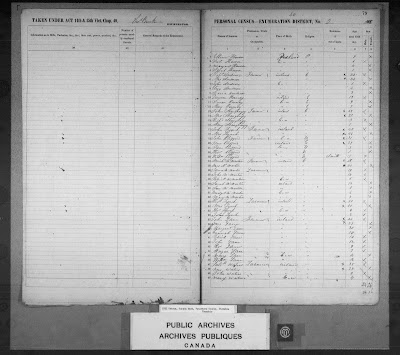
1851 census of Canada East, Canada West, New Brunswick, and Nova Scotia, Canada West, district 30, sub-district 295, p. 79; RG 31; digital images, Library and Archives Canada, Library and Archives Canada (www.bac-lac.gc.ca : accessed 22 Jan 2022); citing microfilm C-11748.

If everything works out you will then be able to find the person you are looking for on the image which is displayed in your browser. You can right-click the image and save the image to your computer so you can look at it again without having to do these steps all over again.

However, don't forget that the 1851/52 Census is actually four pages for Canada East and Canada West. To see the other pages you need to do a little playing with the URL in your browser. 

In the URL or Location line in your browser you see something like "https://central.bac-lac.gc.ca/.item/?app=Census1851&op=img&id=e002367651" when you are viewing the image. All you need to do is increment that "id" number. In this case we want to change it to be e002367652 for the images of pages two and three and then e002367653 to see the image of page four and the start of the next set of people enumerated in that area.

Once you get the hang of doing something like this it really isn't too hard to do.


Tuesday, January 18, 2022

Annie Leontine Chipman and a Census Mystery

It has been a while since I last wrote a blog post. Until fairly recently my research has been of the mundane sort of finding and updating information on the many various branches on my tree. 

However, that was until a few days ago when I was waiting for a presentation I was giving on "Chipping Away at the Brick Wall" for the Southeastern Branch of the New Brunswick Genealogical Society to begin. In that talk I give examples of assumptions I've made in my research and Annie Leontine Chipman, my 1st cousin three times removed (and my 4th cousin 3 times removed...in two different ways...yes, my Chipman line is "interesting" at times), is one such example. I also like to periodically look for information about her since she led an very interesting life and constantly challenges any assumptions I've made in my research. Even her grave marker told an interesting tale since she is a recipient of The Most Excellent Order of the British Empire.

Find a Grave, database and images (https://www.findagrave.com/memorial/167501062/anne-leontine-chipman : accessed 18 January 2022), memorial page for Anne Leontine Chipman (11 Feb 1864–10 Mar 1937), Find a Grave Memorial ID 167501062, citing Oak Grove Cemetery, Kentville, Kings County, Nova Scotia, Canada ; Maintained by LMK (contributor 47573469).
 Find a Grave, database and images (https://www.findagrave.com/memorial/167501062/anne-leontine-chipman : accessed 18 January 2022), memorial page for Anne Leontine Chipman (11 Feb 1864–10 Mar 1937), Find a Grave Memorial ID 167501062, citing Oak Grove Cemetery, Kentville, Kings County, Nova Scotia, Canada ; Maintained by LMK (contributor 47573469).

However, this time it is about her being found in two places in census records of two countries almost at the same time.

Early on in my research days I had found her in the 1881 census of Canada in Kentville, Kings County, Nova Scotia, Canada. That census was taken on April 4, 1881.

1881 census of Canada, Nova Scotia, district 17, sub-district F-1, Kentville, p. 2, dwelling 5, family 5, Annie L Chipman; RG 31; digital images, Ancestry.com Operations, Inc., Ancestry.com (www.ancestry.com : accessed 7 Feb 2013); citing Library and Archives Canada microfilm C-13173.

There I found her in the household of her father Leverett DeVeber Chipman, her mother Nancy, and siblings Wilford (Wilford Henry Chipman), and Eva (Lena Evangeline Chipman). All simple and very straightforward...or so I thought.

As I mentioned, she keeps throwing me curve balls in my research and she did it again in the 1881 census. While waiting for the meeting to begin I pulled up Annie's profile in Ancestry and clicked on the search button not really expecting to find something. Yet I was in for a shock when Ancestry pointed me to an 1881 census in England for an Annie Leoline Chapman who was born about 1864 with "Nova Scotia Kentville (British Subject)" as the place of birth attending as a student at Kilburn College in Kilburn, Middlesex.

1881 census of England, Middlesex, Parish of Willesden, Kilburn, Ecclesiastical Parish of St Johns, folio 54, page 23, Alice Leontine Chapman; digital images, Ancestry.com, Ancestry.com (www.ancestry.com/ : accessed 18 Jan 2022); citing PRO RG 11/1364.

Once I looked at the image I could see that it wasn't "Leotine" but there was an "n" added beneath that word as a correction so it read "Leontine". The place of birth and the age was right so just how was this possible? The 1881 census of England was taken on April 3, 1881 but she is recorded as being in the household of her father on April 4, 1881. There were no airplanes in 1881 so how did she travel more than 4,500 km in a day?

That is when I recalled Janice Nickerson's great presentation she gave titled "Ontario Census Fundamentals" for the Toronto Branch of the Ontario Genealogical Society in November 2021. She had mentioned that the Canadian censuses use the "de jure system" of enumeration. 

So just what does this mean?

In the "Manual containing The Census Act, and the instructions to officers employed in the taking of the second census of Canada, (1881)", of which a copy can be found on the Internet Archive, they state:

"The principle adopted for the registration of the population is that which is called by statists the population de droit or de jure ; that is, the population legally domiciled within the territory of the Dominion, and including all persons who may be temporarily absent from their place of abode, whether at the fisheries, at sea, or in the forest wilderness, &c."
Great.

But how does this really get applied in Annie's situation?

You have to keep reading further in the Instructions to the Enumerators where it states:

"Therefore, the names of seamen at sea, college students and school children, of the sick in hospitals, of inmates temporarily present in educational, charitable or penal institutions, are to be taken down in their own provinces, at their own domiciles or homes, and not at temporary abiding places or institutions. In other words, all living members of one family are to be registered as being present at the family abode, unless they are settled in homes of their own, or have left the country with intention not to return."

This matches Annie Leontine Chipman perfectly. She was attending school and she had left the country but she was going to return back to Canada after school.

How about the 1881 Census of England and Wales? In the "Census of England and Wales, 1881. Instructions to the Various Officers as to Their Duties in Taking the Census" the census was to be "...every living person who abode in every house on the night of Sunday the third day of April one thousand eight hundred and eighty-one..."

It would seem that Canada and England used different rules for determining who shall be enumerated where. That is how Annie can be in two widely separated places almost on the same day.

Of course, in the 30 minutes before I was to give the presentation I was madly creating a new slide for the assumptions section since this assumption of how the Canadian censuses were taken really bit me!

Monday, October 18, 2021

The Unindexed in Ancestry's Canada Voters Lists

I was recently attempting to figure out when Geoffrey Harold Beley of Smithers, British Columbia, the husband of my 1st cousin twice removed, Marguerite Ann Dakin, had passed away. According to family lore recorded on the Kimberley Keepers site, he had died in 1971. And this is where my still unresolved question started and also led me to an issue with the "Canada, Voters Lists, 1935-1980" collection on Ancestry.

But first some background information on why I ended up looking at the "Canada, Voters Lists, 1935-1980" collection. When looking for someone who died in or before 2000 in British Columbia the starting place to find a death registration is the Genealogy - General Search page from the BC Archives. I searched using various combinations of Geoff's name with no luck. So I turned to the various newspaper archive sites I use to see if I might find him mentioned. On Newspapers.com in their Publisher Extra collection I came across a June 2, 1971 article in The Smithers Interior News with a picture and article about Geoff Beley where he was honoured at a social evening on May 28, 1971 upon his retirement as a Government Agent. I even came across a mention in the December 15, 1971 edition of that same newspaper stating, "Mr. Geoff Beley returned to the coast last week on business." Assuming there is only one Geoff Beley, it would seem that he is still alive then. But after that date he just sort of disappears from the digitized newspapers I've been able to find online.

So I turned to the "Canada, Voters Lists, 1935-1980" collection on Ancestry. I had found him listed in the 1962, 1965, 1968, and 1972 voters lists without any problem but I didn't find him in the 1974 voters lists so I figure he may have died between the end of 1971 and 1974. Since I was already in the collection I decided to also update the profile for his wife Marguerite to include those voters lists as Ancestry sources. That is when I ran into the issue on Ancestry.

It seems like when Ancestry created the indexes for that collection they missed people. 

Ancestry.com, "Canada, Voters Lists, 1935-1980," database and images, Ancestry (www.ancestry.com : accessed 18 Oct 2021), screen capture for Geoffrey Beley of Smithers, 1972, Rural Polling Division No. 119, Telkwa, Electoral District of Skeena, British Columbia, p 1; citing Library and Archives Canada; Ottawa, Ontario, Canada; Voters Lists, Federal Elections, 1935-1980,  R1003-6-3-E (RG113-B), microfilm-6214.
Ancestry.com, "Canada, Voters Lists, 1935-1980," database and images, Ancestry (www.ancestry.com : accessed 18 Oct 2021), screen capture for Geoffrey Beley of Smithers, 1972, Rural Polling Division No. 119, Telkwa, Electoral District of Skeena, British Columbia, p 1; citing Library and Archives Canada; Ottawa, Ontario, Canada; Voters Lists, Federal Elections, 1935-1980,  R1003-6-3-E (RG113-B), microfilm-6214.

Above is a screen capture of the 1972 Voters List for the Electoral District of Skeena, Rural Polling Division No. 119 Telkwa with Geoffrey Beley highlighted. We can plainly see that a Mrs. Marguerite Beley is listed below his name. We can also see a Mrs. Margaret E. Arkinstall listed above Geoffrey's name. But look below in the index section of that page in the virtual microfilm strip. Both of those women are missing! Now Mrs. Vyvyan M. Bradford is included in the index so it wasn't a matter of ignoring women or all names starting with "Mrs.". However, when I looked at that page and the associated index quite a number of the names which start with "Mrs." have been omitted.

I noticed that if I hovered my mouse over the various names, if the name was in the index, the name was highlighted in orange and a pop-out box would appear. We can see that when I hovered over Mrs. Vyvyan Bradford:

Ancestry.com, "Canada, Voters Lists, 1935-1980," database and images, Ancestry (www.ancestry.com : accessed 18 Oct 2021), screen capture for Mrs. Vyvyan Bradford of Telkwa, 1972, Rural Polling Division No. 119, Telkwa, Electoral District of Skeena, British Columbia, p 1; citing Library and Archives Canada; Ottawa, Ontario, Canada; Voters Lists, Federal Elections, 1935-1980,  R1003-6-3-E (RG113-B), microfilm M-6142.
Ancestry.com, "Canada, Voters Lists, 1935-1980," database and images, Ancestry (www.ancestry.com : accessed 18 Oct 2021), screen capture for Mrs. Vyvyan Bradford of Telkwa, 1972, Rural Polling Division No. 119, Telkwa, Electoral District of Skeena, British Columbia, p 1; citing Library and Archives Canada; Ottawa, Ontario, Canada; Voters Lists, Federal Elections, 1935-1980,  R1003-6-3-E (RG113-B), microfilm M-6142.

But it didn't happen when I tried the same with Mrs. Marguerite Beley or Mrs. Margaret Arkinstall. Both of their names remained unhighlighted. And they weren't the only ones on the page missed.

Maybe it was only isolated to the 1972 images. Alas, it wasn't. I checked the 1968 voters list for that same place and although both Geoffery and Margaret Beley were indexed, a few names down I found that Mrs. Lorraine E. Cullis of Telkwa wasn't indexed. And it just isn't women missed. On that same 1968 page Mrs. Lucille C. and David F. Brooks, both of Telkwa, are missing from the index but Robert L. Brooks of Telkwa recorded before them and Vincent S. Brooks of Telkwa record after them are indexed. I also check the 1965 list and also found people in the image not listed in the index. So it seems to be an issue with a number of years.

Why is this a problem for us?

First of all, imagine the indexes for the 1921 census of Canada missing every tenth or twentieth person on the page? How frustrating would that be for your research?

Secondly, it is enough of a challenge to find people when the human or computer OCR generated indexes butcher names, like what happened to "Mis Marrmrey Beley" in the 1968 voters list. Yet it turns into a genealogist's nightmare when names are present in the image but not included in the index. To add to one's aggravation, there doesn't seem to be a way for us, the customer, to add those missing names into the index.

Finally, the voters lists covers the time period after the 1921 census and can act as a census substitute. The voters lists don't work well as a census substitute for those with relatively common names but for someone like Geoffrey Harold Beley and his wife Marguerite these lists can allow you to track people over the years and possibly narrow down when they may have passed away or moved out of the country.

So, if you can't find people in the index for the "Canada, Voters Lists, 1935-1980" collection on Ancestry, it might not be that they are dead, have moved to another country, or the transcription is horrible. It might be that they were left off the index. So good luck in reading through the images!

Tuesday, August 24, 2021

Finding on the Ground: Wrap Up

This wraps up, at least for now, what I've been calling my "Finding on the Ground" series of blog posts.

It all started back in March 2020 with what I thought to be a simple question on finding the agricultural schedule of the 1861 census. Little did I know that I would end up digging through various census schedules, delve into the "Land and property" collections on FamilySearch, initially struggle with OnLand, give a workshop, and also speak to several genealogy societies about the challenges of land research in Ontario...all while in the midst of a pandemic.

I've gathered the links to each blog post I've written on this general subject from the past year or so. I may periodically update this post if (probably when) I have additional posts on this subject.

Censuses

Finding on the Ground

Miscellaneous:

Extra Files


It has been a learning experience for me and hopefully the information provided will help you in your own research journey.

[Updated 10 Jun 2026]

Tuesday, August 17, 2021

Finding on the Ground: Ordering from OnLand

You've finally figured out where your ancestors resided in Ontario and have actually found the page in the Abstract/Parcel Register Book within the Ontario Land Property Access Portal, AKA OnLand. You've also checked out the Land Record books on FamilySearch for the county in which they resided but those books end before the date of registration of the instrument you are wanting to find. So what's next?

How about ordering the historical instrument from OnLand?

Such was the case when I wanted to get the instrument for when Louis and Lydia A. Darou sold some of their property which was registered on 25 Oct 1913.

Screen capture from OnLand from Lanark LRO(27), Historical Books, Abstract Parcel Register Book, North Elmsley, Concession 8-10, Concession 10, Lot 27, North East Half, image 395 of 465.

I was able to find the bargain and sale (B & S) for instrument 2H-2701 between John Alexander Stewart and Louis and Lydia A. Darou registered on 19 May 1904 by looking through the "North Elmsley Township (v. H, 2505-2796) 1901-1906" within the "Land records of Lanark County, 1802-1921" collection on FamilySearch.

Alas, FamilySearch doesn't have volume I in their collection for me to look up the next instrument 2I-3241. So it was off to make my first purchase from OnLand.

Before starting an order, you can login with for your free OnLand account. Having an account doesn't let you go back through your orders to re-download any electronically sent items but it does at least keep an order history so you know when you have gone over your genealogy budget. The order tracking also doesn't give you a useful description. In the case of the order I'm going to walk though, all the the order history states for the description is "Instrument". Not exactly helpful.

The first step in the ordering process is to select the correct Land Registry Office (LRO). You should already know it since it is the same LRO from where you found the Abstract/Parcel Register Book for the property. In this case, Lanark (LRO 27). Next, since I am wanting a document, I selected "Documents" from the top menu and then "Instruments, Plans and Evidence" from the next display page since I want to get a copy of an instrument.

That brought me to the page which, although seemingly very simple to deal with, causes the most grief for many ordering an instrument from OnLand for the first time. This is the page asking for the registration number.

Screen capture from OnLand from the Instruments, Plans and Evidence request page.

You see, the registration number isn't just the instrument number you found in the Abstract/Parcel Register Book. No, that would be too easy. Instead you need to find the correct prefix of the type of document your are requesting.

OnLand does provide a link to the starting page with the prefix codes under the text "correct prefix" in the descriptive paragraph. So let's pop over to that page under the OnLand Help Centre / ServiceOntario Prefixes and Cross-References. Here we find a list of the Land Registry Offices. Scroll to the one we want and click on it. In this case, since I'm wanting instruments from the Lanark LRO I clicked on that link and it displayed the list of the possible documents.

Screen Capture from the OnLand Help Centre ˃ ServiceOntario Prefixes and Cross-References page for Lanark LRO 27 index reference links.

I then selected "Instrument Prefix List: Lanark" (I've circled it above in the image). since I'm looking for the prefix list for the instruments. That action opened up a PDF file with all kinds of codes and dates and even instrument number ranges.

The list can be long and sometimes confusing. Yet we already have the information needed to find the prefix code we are wanting to use:

  • Type of instrument: B & S
  • Date of the instrument: 25 Oct 1913
  • Instrument number: 2I-3241
  • Location: North Elmsley

I wish I could say that there was a standard order for the prefix lists, but there isn't. I took a quasi-random sample from 4 LRO lists and not one was ordered the same way as any of the others. What we need to do is to just look through the list to find something that seem to fit the bill based on the date of the instrument we are hoping to order.

Screen Capture from the Lanark LRO 27 Instrument Prefix List PDF showing North Elmsley prefix codes.

In looking through the list I came across the entries for North Elmsley. Since the date of the instrument I want to get is between Jun 18/1867 and Dec 31/1960 I decided that the prefix code must be "NE". If the registration date of the instrument has been between Jan 25/1856 and Jun 18/1867 then the prefix code would have been NEB. It is really important to pay attention to the dates for when an instrument was registered. If it had been an instrument from the General Register I would have to have looked for those books possibly under the "Miscellaneous" section of the PDF.

I now have the first part of the registration number, "NE". However, the instrument number in the Abstract/Parcel Register Book has this "2I-" before it. We need to toss that part away since it references the volume number and is not needed in this case. Now if we had our hands on the actual Land Record books then we could look up the instrument in the volume "I" books. But we don't so back to OnLand...

In theory, after all that work, the registration number for my request is "NE3241".

Screen capture from OnLand from the Instruments, Plans and Evidence request page with Registration Number NE3241 filled in.

However, when I clicked "Search" I got this scary message:

Screen capture from OnLand from the Instruments, Plans and Evidence request page with warning that Document NE3241 could not be found.

Did I do something wrong? Did I mess up the code?

Actually, no. It is just that the instrument is not yet in their system. I just needed to click on the "Request Document" button. In doing that this message was displayed with a calming green background:

Screen capture from OnLand from the Instruments, Plans and Evidence request page with successful Request Submitted notice.

Time passed...a little more than 72 hours actually. Usually I will give the folks managing OnLand five working days to put the instrument into the system.

To see if they could find and upload the instrument to their computers I had to repeat the process of requesting NE3241 from OnLand. Since I've already done this before and had written down the registration number (remember...WRITE DOWN THE REGISTRATION NUMBER!) this was quick and almost painless.

I guess I did everything right since I when I clicked search this time the following was displayed:

Screen capture from OnLand from the Instruments, Plans and Evidence request page with "1 Instrument found for NE3241" notice.

Now I could purchase the instrument. Generally, for our genealogy research we don't need to have the copy certified and quite often the digital copy is just fine so we can save money and get the copy of the instrument for $3 plus $0.39 HST for a grand total of $3.39.

After going to the checkout and paying for my order I was brought to the page to download the PDF (I've blanked out the email and order number):

Screen capture from OnLand showing a successful order transaction for instrument NE3241.

Make sure you download the copy of the instrument from here just in case the email OnLand sends you with the PDF attached somehow gets lost!


Tuesday, August 10, 2021

1921 Census and Addresses in Ontario

Over the past year I've written about finding the location of a property in Ontario in the 1851, 1861, 1871, 1901, and 1911 Censuses of Canada. I've even written about the "missing" images of the 1861 Census of Canada West on Ancestry. A number of times I've mentioned that the schedules for the 1881 and 1891 Censuses of Canada which have the property details didn't survive to the present day. So this leaves the 1921 Census of Canada to be covered (at least until the 1931 Census of Canada is released to the public). So off we go...

Much like the 1911 Census of Canada, only "Schedule 1, Population" was preserved to be digitized and the other four schedules no longer exist. But like the 1911 Census of Canada, the Population schedule for the 1921 Census of Canada can include specific details of where the household resided.

Before we look at what we might find we need to read what was required to be recorded. The information can be found on the Census of Canada, 1921 landing page at Library and Archives Canada under the Column headings and interpretation section. For column 4, the description says:

Column 4. Place of Abode (Section or Township)
In rural localities, give parish, section, township, range and Meridian.

What do the instructions to the enumerators state? For that we need to read the "Sixth Census of Canada, 1921, Instructions to Commissioners and Enumerators". On page 20 and 21 we find written:

71. Columns 4 and 5. - Place of Abode.  In the case of a city town or incorporated village (see Instructions Nos. 55 and 56) the enumerator will enter the Number of the house and the Street in column 4 and the name of the Ward in column 5. In the case of rural districts, the name of the Township, Lot, Parish or Cadastral number will be entered in column 4 and the name of the Municipality in column 5.

Provided, however, that in Manitoba, Saskatchewan and Alberta, the Section, Township, Range and Meridian will be entered respectively in columns 4, 4a, 4b and 4c, adding the name of the Municipality, Local Improvement District or Unorganized Territorial Unit, where such exists, in column 5.

Let's look at some examples of what might be found in the records for Ontario.

The 1921 census of Canada is available on the Library and Archives Canada (LAC) site for free. You can search for people and view pages there. It is also on Ancestry.ca under their "1921 Census of Canada" collection. It is free at access on Ancestry as long has you have a login account but you DO NOT need a paid subscription!

For non-urban locations you will quite often only see the township recorded such as we find for the district of Bruce South, sub-district of Huron Township, Division 1:

1921 census of Canada, Ontario, district 70, sub-district 36, Huron Township, p. 5; RG 31; digital images, Ancestry.com Operations, Inc., Ancestry.com (www.ancestry.com : accessed 17 Nov 2013).
1921 census of Canada, Ontario, district 70, sub-district 36, Huron Township, p. 5; RG 31; digital images, Ancestry.com Operations, Inc., Ancestry.com (www.ancestry.com : accessed 17 Nov 2013).

Yet some of the enumerators went the extra distance (mile? kilometre?) and also included the concession and lot number for the property as seen in this extract from Middlesex East, London Township:

1921 census of Canada, Ontario, district 102, sub-district 14, London Township, p. 3; RG 31; digital images, Ancestry.com Operations, Inc., Ancestry.com (www.ancestry.com : accessed 12 Aug 2018).
1921 census of Canada, Ontario, district 102, sub-district 14, London Township, p. 3; RG 31; digital images, Ancestry.com Operations, Inc., Ancestry.com (www.ancestry.com : accessed 12 Aug 2018).

As we can see, not only did the enumerator record that the household of John L. Morris is in London Township but they are on Concession 3, lot 18.

What about the folks in the villages, towns, and cities?

Again, it depends on the enumerator and type/size of the city, town, or village. For example, we can see that the household of Charles Heatherington is residing at 94 Hamilton in Dalhousie Ward, Ottawa.

1921 census of Canada, Ontario, district 71, sub-district 46, Ottawa, p. 4; RG 31; digital images, Ancestry.com Operations, Inc., Ancestry.com (www.ancestry.com : accessed 1 Jul Aug 2020).
1921 census of Canada, Ontario, district 71, sub-district 46, Ottawa, p. 4; RG 31; digital images, Ancestry.com Operations, Inc., Ancestry.com (www.ancestry.com : accessed 1 Jul Aug 2020).

Unfortunately, that is not always the case. Here the enumerator for Kingsville only recorded the street name. This is quite common for the smaller towns and villages.

1921 census of Canada, Ontario, district 78, sub-district 34, Kingsville p. 9; RG 31; digital images, Ancestry.com Operations, Inc., Ancestry.com (www.ancestry.com : accessed 8 Sep 2014).
1921 census of Canada, Ontario, district 78, sub-district 34, Kingsville p. 9; RG 31; digital images, Ancestry.com Operations, Inc., Ancestry.com (www.ancestry.com : accessed 8 Sep 2014).

Yet it still helps us narrow down where the people lived. And any clue, no matter how small, is a good clue!


Tuesday, August 3, 2021

Finding on the Ground: An Ontario Concession/Lot on a Map

You have finally figured out where your rural Ontario ancestor lived by finding the location in the census records (1851, 1861, 1871, 1901, or 1911) or through other means and have the township, concession, and lot details. Now you want to take a road trip and actually stand where they may have trod. 

So let's find that location on a map!

At the end of my previous post "Finding on the Ground - A Rural Route Address in Ontario" I skipped over the detailed process of how to do this. Now I'm going to walk you through the steps I took but using a different property than in that example.

The first step is to visit the "Make a Topographic Map" page hosted by the Ontario Ministry of Natural Resources and Forestry. After a few moments a disclaimer will appear concerning the Ontario Parcel Licence Agreement. Read through it and at the bottom of the box click the "I Accept" button to continue (assuming you do agree to the license).

At the top of the page is a menu bar. Click on the word "Search" then the "Search By Location" button (as highlighted below):

Screen capture of the menu bar with Search selected and the Search By Location button highlighted from the Ontario "Make a Topographic Map" site (accessed 5 May 2026).

A menu will appear asking how you want to Search By Location. Since you have the Township, Concession, and Lot of the property you will want to "Select a Township & Lot/Concession" from the list:


Screen capture of the "Search By Location" menu from the Ontario "Make a Topographic Map" site (accessed 12 May 2026).

You are now prompted for the Township, Concession, and Lot details. Each of the items to be filled in need to be selected from the drop down item list. The Concession and Lot items change based on the Township and Concession selected.

Here is filled in the details for my 4th great-grandfather, Alexander Fraser, who resided in Drummond Township, on the 2nd Concession in lot 12 in the 1851 and 1816 censuses of Canada West.

Screen capture of the "Select a Township & Lot/Concession" menu from the Ontario "Make a Topographic Map" site with details of Drummond Township, Concession 2, Lot 12 filled in (accessed 12 May 2026).

Clicking on the Search button will bring you to the property on the map and highlight it in orange like you see below.

Screen capture of the search result returned by "Select a Township & Lot/Concession" from the Ontario "Make a Topographic Map" site for Drummond Township, Concession 2, Lot 12 (accessed 12 May 2026).

You can zoom in and out of the map to see where the property is in relation to other places. In the bottom corner of the map beside the scale bar there is even a button to show an imagery map instead of the default topographic map.

Great, you have the location on the map. 

But what about getting directions to the place? 

For this I generally just right-click my mouse (I have a Windows computer, not too certain how a Mac or iPad user will do that) on the red box near a road. This will bring up a box with different actions. However, it also gives the latitude and longitude of where you right-clicked.

Screen capture of the search result returned by "Select a Township & Lot/Concession" from the Ontario "Make a Topographic Map" site for Drummond Township, Concession 2, Lot 12 with the action box displayed (accessed 12 May 2026).

We now have the location of Lat: 44.937° N and Lon: 76.194° W. You can even copy that text into your clipboard. Why do that? For the next step which is using Google Maps.

Open up Google Maps and in the Search Google Maps box put in the coordinates you got from the map on the Make a Topographic Map site.

Screen capture from Google Maps with the coordinates entered for 44.937° N 76.194° W.

Just a heads up, you have to remove the "Lat:" and "Lon:" words if you do a copy and paste of the coordinates for this to work.

If everything has worked properly then Google will bring you to the location on their map.

Screen capture from Google Maps for the coordinates 44.937° N 76.194° W and Satellite view selected.

With the location pinpointed you can ask Google for driving directions, save the location if you have logged in with your Google account, send to your phone, or even share with others via social media. If the Google Streetview car has driven past the place you can even see what the view looks like if you were standing on the road.

You might even make your own custom Google Map highlighting the various properties of nearby ancestors and other connected relatives.

Enjoy your road trip!


[Update 12 May 2026 - Updated the instructions to get to the Make a Topographic Map site and also the screen captures to reflect the changes since 2021.]